Two USB-C sockets on the Anker 555 do different jobs
One is power input. One is data. Neither is the HDMI output.

| Connection on A8383 | Use it for | Do not assume |
|---|---|---|
| USB-C PD-IN | Compatible power input | Data or video output |
| USB-C data | Up to 10Gbps data | Monitor video or device charging |
| HDMI | Supported display output | Any mode on any host port |
When a monitor stays dark, buying another cable is an easy next step. On the Anker 555, first check whether the monitor is connected to a socket that can carry video at all.
Follow the socket's job, not its shape
The A8383 manual distinguishes the PD-IN charging socket from the 10Gbps USB-C data socket. Its display path is HDMI. The two USB-C-shaped connections do not promise the same functions, and neither can be promoted to a display output by wishful cable shopping.
For an SSD, use a documented data port. For laptop pass-through charging, use PD-IN with the required charger and cable. For the monitor, follow the HDMI instructions and host requirements.
The computer still has to provide the display signal
The hub's manual requires a laptop USB-C connection with DisplayPort Alt Mode for HDMI display output. If the computer's port does not support that function, the hub cannot create it. Look up the exact laptop port, especially when the machine has more than one similar-looking socket.
The fastest useful support request includes the laptop model, operating system, hub model, monitor and cable connection. “It has USB-C” does not identify enough of the setup.
Is this the right hub to buy?
Consider the 555 when your job is one supported HDMI display, USB peripherals, storage and wired Ethernet through a compact hub. Do not choose it for a requirement that depends on video from its USB-C data socket.
Its US listing showed $49.99 when checked. Before ordering, read the display and power guides linked below so the total purchase includes any required charger and cables. If your present hub has the right sockets already, correcting the connection may solve the problem for nothing.
Before you decide
Will a USB-C-to-HDMI cable fix the data socket?
No. A passive choice of cable cannot add the undocumented video output to that data-only socket.
Does the hub work without a wall charger?
The product documentation says a wall charger is needed for charging the laptop through the hub, not simply to use its other functions.
Check the product and full package
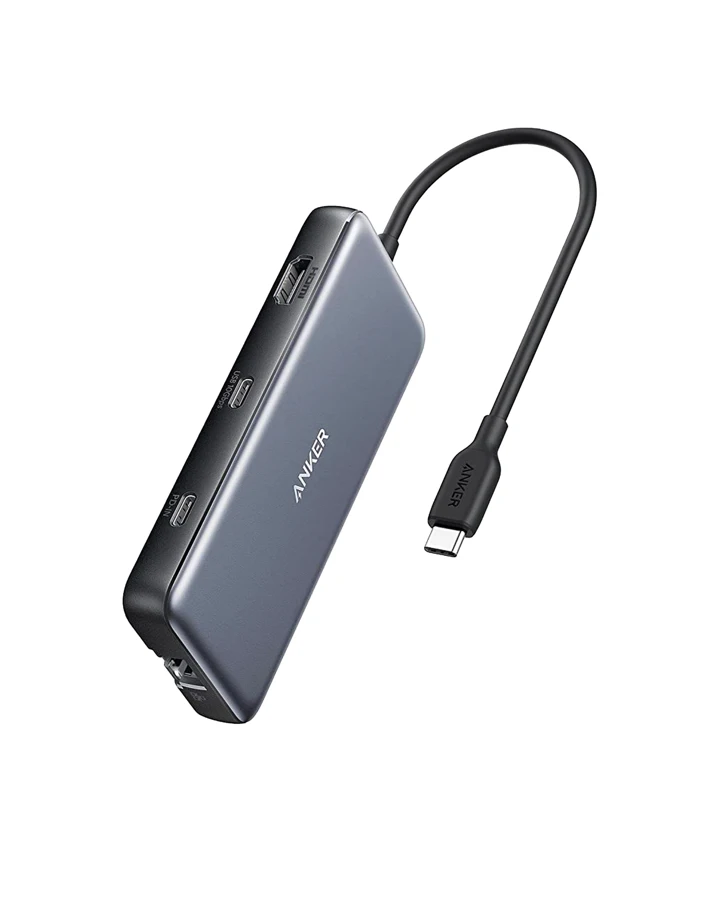
One HDMI display, fast USB storage and wired Ethernet.
A8383 · Price checked Sep 7, 2026Retailer prices and terms can change. These links currently earn no commission. Product images are provided by the manufacturer or retailer.